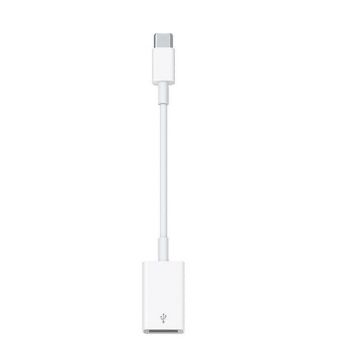
The USB-C to USB Adapter lets you connect iOS and iPadOS devices and many of your standard USB accessories to a USB-C or Thunderbolt 3 (USB-C)–enabled Mac, iPad, or iPhone.
Plug the USB-C end of the adapter into a USB-C or Thunderbolt 3 (USB-C) port on your Mac, iPad, or iPhone, and then connect your flash drive, camera, or other standard USB device. You can also connect a Lightning to USB cable to sync and charge your iPhone, iPad, or iPod.
Technical Specifications
Connections
• USB-C
Compatibility
iPhone Models
• iPhone 17 Pro Max
• iPhone 17 Pro
• iPhone Air
• iPhone 17
• iPhone 17e
• iPhone 16 Pro Max
• iPhone 16 Pro
• iPhone 16 Plus
• iPhone 16
• iPhone 16e
• iPhone 15 Pro Max
• iPhone 15 Pro
• iPhone 15
• iPhone 15 Plus
iPad Models
• iPad Pro 13-inch (M5)
• iPad Pro 11-inch (M5)
• iPad Pro 13-inch (M4)
• iPad Pro 12.9-inch (3rd, 4th, 5th, and 6th generation)
• iPad Pro 11-inch (M4)
• iPad Pro 11-inch (1st, 2nd, 3rd, and 4th generation)
• iPad (A16)
• iPad (10th generation)
• iPad Air 13-inch (M4)
• iPad Air 11-inch (M4)
• iPad Air 13-inch (M3)
• iPad Air 11-inch (M3)
• iPad Air 13-inch (M2)
• iPad Air 11-inch (M2)
• iPad Air (4th and 5th generation)
• iPad mini (A17 Pro)
• iPad mini (6th generation)
Mac Models
• MacBook Neo (2026)
• MacBook Air (2018 and later)
• MacBook Pro (2019 and later)
• iMac (2019 and later)
• iMac Pro (2017)
• Mac mini (2018 and later)
• Mac Studio (2022 and later)
• Mac Pro (2019 and later)